
A homeowner calls about a kitchen renovation.
You discuss the project, arrange a site visit, take measurements, and send an estimate.
Then you wait.
A few days pass. The homeowner has not responded, and your team is already busy with other jobs.
Did someone follow up?
Is the customer comparing quotes?
Did they have questions about the estimate?
Or has the opportunity simply been forgotten?
For small contractors and home service businesses, winning work often depends on what happens between the first inquiry and the customer's decision.
The problem is rarely a lack of leads alone.
It is keeping track of every inquiry, estimate, site visit, and follow-up while managing the demands of running the business.
A CRM for contractors can help organize that process so potential jobs do not disappear between conversations.
Why contractor sales needs more than a contact list
Contractors often manage sales differently from businesses with dedicated sales departments.
The person answering an inquiry might also be visiting job sites, preparing estimates, coordinating with suppliers, or supervising work.
A small team might have an owner, an office manager, an estimator, and a few people handling customer communication.
Everyone is busy.
That makes it easy for information to become scattered.
A new inquiry arrives by phone.
A site visit goes into someone's calendar.
Measurements are saved in a document.
The estimate is sent by email.
The follow-up is left to memory.
Each part of the process may be working individually, but there is no single view of where the opportunity stands.
A useful contractor CRM connects those steps around the customer and potential job.
It should help the team answer:
- Who contacted us?
- What work are they interested in?
- Have we visited the site?
- Has an estimate been sent?
- Who is responsible for the opportunity?
- What needs to happen next?
- When should we follow up?
Those are the questions that matter before a project is won.
1. Capture every inquiry before it gets lost
Contractor inquiries can arrive through several channels.
A homeowner might call directly, submit a website form, send an email, or contact the business after receiving a recommendation.
The first challenge is making sure each inquiry gets recorded.
A basic inquiry record might include:
- Customer name
- Phone number
- Email address
- Property or job location
- Type of work requested
- Brief description of the project
- Lead source
- Person responsible for responding
Not every inquiry needs a detailed project record immediately.
At this stage, the priority is capturing enough information to qualify the opportunity and decide what happens next.
For example:
Customer: Sarah Mitchell
Job: Bathroom renovation
Location: North Brooklyn
Stage: New inquiry
Owner: Alex
Next action: Call to discuss project requirements
Due: Tomorrow
Now the inquiry has a clear next step instead of becoming another message someone needs to remember.
2. Qualify the job before preparing an estimate
Not every inquiry will become a suitable project.
Before committing time to a site visit or detailed estimate, contractors often need to understand the basic requirements.
Useful qualification questions might include:
- What type of work does the customer need?
- Where is the property located?
- What is the approximate scope?
- Is there a preferred timeline?
- Does the customer have a budget range?
- Who will make the final decision?
- Is a site visit required before estimating?
The answers help determine whether the opportunity is worth pursuing and what should happen next.
For example, a roofing contractor may need to understand the property type and nature of the repair.
A remodeling company may need more information about the project's scope and timing.
An HVAC contractor may need to arrange an inspection before recommending work.
The qualification process will vary by trade.
The important thing is that the information remains connected to the opportunity rather than getting lost in separate conversations.
3. Track site visits as part of the sales process
Site visits are a natural milestone in many contractor sales workflows.
They can also create gaps in communication.
Someone schedules the visit.
Another person attends.
Measurements are taken.
The customer asks questions.
Then the team needs to prepare an estimate.
If responsibility is unclear, several days can pass before anyone moves the opportunity forward.
A CRM should help track the commercial next step associated with the visit.
For example:
Job: Kitchen renovation
Stage: Site visit
Owner: Jordan
Next action: Complete site measurements
Due: Tuesday
After the visit:
Next action: Prepare and send estimate
Due: Friday
Relevant notes can also be recorded with the opportunity.
These might include customer preferences, access restrictions, project concerns, or information needed before pricing the work.
The goal is not to turn the CRM into a technical job management system.
It is to make sure the site visit leads to the next sales action.
4. Keep estimates connected to opportunities
For many contractors, sending an estimate is one of the most important steps in the sales process.
It is also where opportunities can stall.
The estimate may be accurate and competitive.
But the customer might be reviewing other options, waiting for financing, discussing the project with a partner, or reconsidering the scope.
Sending the estimate does not mean the sales process is finished.
Your team should know:
- Which customer received the estimate
- Which job it relates to
- When it was sent
- The estimated value
- Whether the customer has responded
- Who is responsible for following up
- When the next conversation should happen
For example:
Customer: Sarah Mitchell
Job: Bathroom renovation
Estimate value: $18,500
Stage: Quote sent
Owner: Alex
Next action: Call Sarah to discuss estimate
Due: Thursday
That is much more useful than a spreadsheet row marked "Estimate sent."
The opportunity now has a specific action attached to it.
5. Build a consistent estimate follow-up process
A common contractor sales problem is assuming that interested customers will call back.
Some will.
Others may be interested but need another conversation before making a decision.
A follow-up gives the contractor an opportunity to answer questions, clarify the scope, discuss timing, or understand what is holding up the decision.
It does not need to be aggressive.
The timing should reflect the type of work, the customer's expectations, and any timeline agreed during the conversation.
Example: After sending an estimate
Day 0: Estimate sent
Send the estimate through your usual quoting process.
Record the activity and schedule an appropriate follow-up.
First follow-up: Confirm receipt and answer questions
Ask whether the customer received the estimate and whether anything needs clarification.
Next follow-up: Understand the decision process
If the customer is still considering the project, ask about their expected decision timeline.
Later follow-up: Reconnect at the agreed time
If the project has been postponed, record when the customer wants to revisit it.
This is an illustrative sequence, not a universal schedule.
A small repair job may require a much shorter decision process than a major renovation.
The important habit is deciding when the next conversation should happen instead of leaving the estimate open indefinitely.
6. Build a contractor sales pipeline around real milestones
A contractor pipeline should reflect the steps between receiving an inquiry and winning a job.
For example:
New inquiry → Qualified → Site visit → Quote sent → Follow-up → Scheduled → Completed
Not every business needs all of these stages.
A contractor who provides estimates without site visits may use a shorter pipeline.
A company handling larger renovation projects may need additional stages for design consultations or approvals.
The purpose of pipeline stages is to show meaningful progress.
Avoid creating a separate stage for every phone call or email.
Those are activities.
Stages should describe where the opportunity stands in the broader process.
Example contractor pipeline
| Stage | Meaning | Typical next action | | --- | --- | --- | | New inquiry | Customer has requested information | Call to qualify the job | | Qualified | Opportunity appears suitable | Arrange site visit | | Site visit | Inspection or consultation is needed | Complete visit and prepare estimate | | Quote sent | Estimate has been delivered | Follow up for feedback | | Follow-up | Customer is considering the estimate | Clarify questions or decision timeline | | Scheduled | Customer has accepted and work is planned | Confirm relevant handoff | | Completed | Work has finished | Schedule customer check-in if appropriate |
For teams using a CRM primarily for sales, it may make sense to mark the opportunity as won when the customer accepts the estimate and track project delivery elsewhere.
The right structure depends on where the CRM's responsibility ends and the operational workflow begins.
7. Make ownership clear when several people are involved
Small contractor teams often divide responsibilities informally.
An office manager receives the inquiry.
The owner conducts the site visit.
An estimator prepares the quote.
Someone else handles scheduling.
That can work well, but it also creates opportunities for confusion.
Who follows up after the estimate?
Who contacts the customer if the project scope changes?
Who confirms the next conversation?
The opportunity should have one clear owner, even when several people contribute.
For example:
Job: Commercial office renovation
Deal owner: Taylor
Site visit: Jordan
Estimate preparation: Alex
Next action: Send revised estimate
Responsible person: Taylor
Due: Friday
The people involved can collaborate, but responsibility for moving the opportunity forward should remain clear.
This is especially important when the owner is also managing active jobs and cannot personally remember every open estimate.
8. Track job details without turning your CRM into project management software
Contractors need information that is different from a typical B2B sales team.
Depending on the business, useful fields might include:
- Job type
- Property address or service area
- Estimated project value
- Site visit date
- Quote sent date
- Expected start date
- Permit status
- Materials needed
- Priority
- Assigned crew or estimator
However, not all of this information needs to live in the CRM.
Ask whether the field helps your team qualify the opportunity, prepare the estimate, communicate with the customer, or move the sale forward.
If the information is primarily used for managing construction work after the job is won, it may belong in your project management system instead.
For example, tracking whether permit approval is affecting the customer's decision may be relevant to sales.
Managing the complete permit process is a different operational requirement.
The distinction helps prevent the CRM from becoming another complicated system the team needs to maintain.
9. Give the team a clear daily follow-up list
Contractors rarely spend the entire day sitting at a desk reviewing opportunities.
They may be on job sites, traveling between appointments, or speaking with customers.
That makes a clear daily task view particularly valuable.
Instead of scanning every opportunity, the person responsible should be able to see which actions need attention.
For example:
Today's priorities
- Call homeowner about roof estimate
- Confirm Thursday's kitchen renovation site visit
- Send revised bathroom estimate
- Follow up on commercial maintenance proposal
- Check whether customer has approved updated scope
The team should also be able to identify overdue actions.
If a follow-up was due yesterday, it should not disappear simply because the date has passed.
A useful CRM helps make outstanding commitments visible.
10. Keep customer communication and job history together
A customer relationship may involve several conversations before work begins.
There may be an initial call, site visit, estimate, revised quote, and questions about timing.
If those interactions are scattered across inboxes and personal notes, it becomes harder for another team member to understand the opportunity.
Keeping relevant communication history together helps the team answer:
- What did the customer originally request?
- What was discussed during the site visit?
- Was the estimate revised?
- What questions have already been answered?
- What did we promise to do next?
This matters when someone is unavailable or when responsibility changes.
It also helps when an existing customer returns with another project.
The team can review the relationship rather than start from scratch.
What should happen after the customer accepts the estimate?
Winning the job is an important milestone.
It also creates a transition between sales and delivery.
At that point, the team should confirm that the appropriate person or system has the information needed to begin work.
That may include:
- Customer contact details
- Property address
- Agreed scope
- Accepted estimate
- Expected timeline
- Relevant customer notes
- Outstanding questions or commitments
A CRM can help preserve the relationship history and record the handoff.
However, scheduling crews, managing materials, tracking job costs, and coordinating daily field work may require specialized operational tools.
A contractor CRM does not need to replace those systems to provide value.
Its role is to make the customer acquisition process clearer and help ensure the relationship does not lose momentum.
How Nudge supports contractors and home service businesses
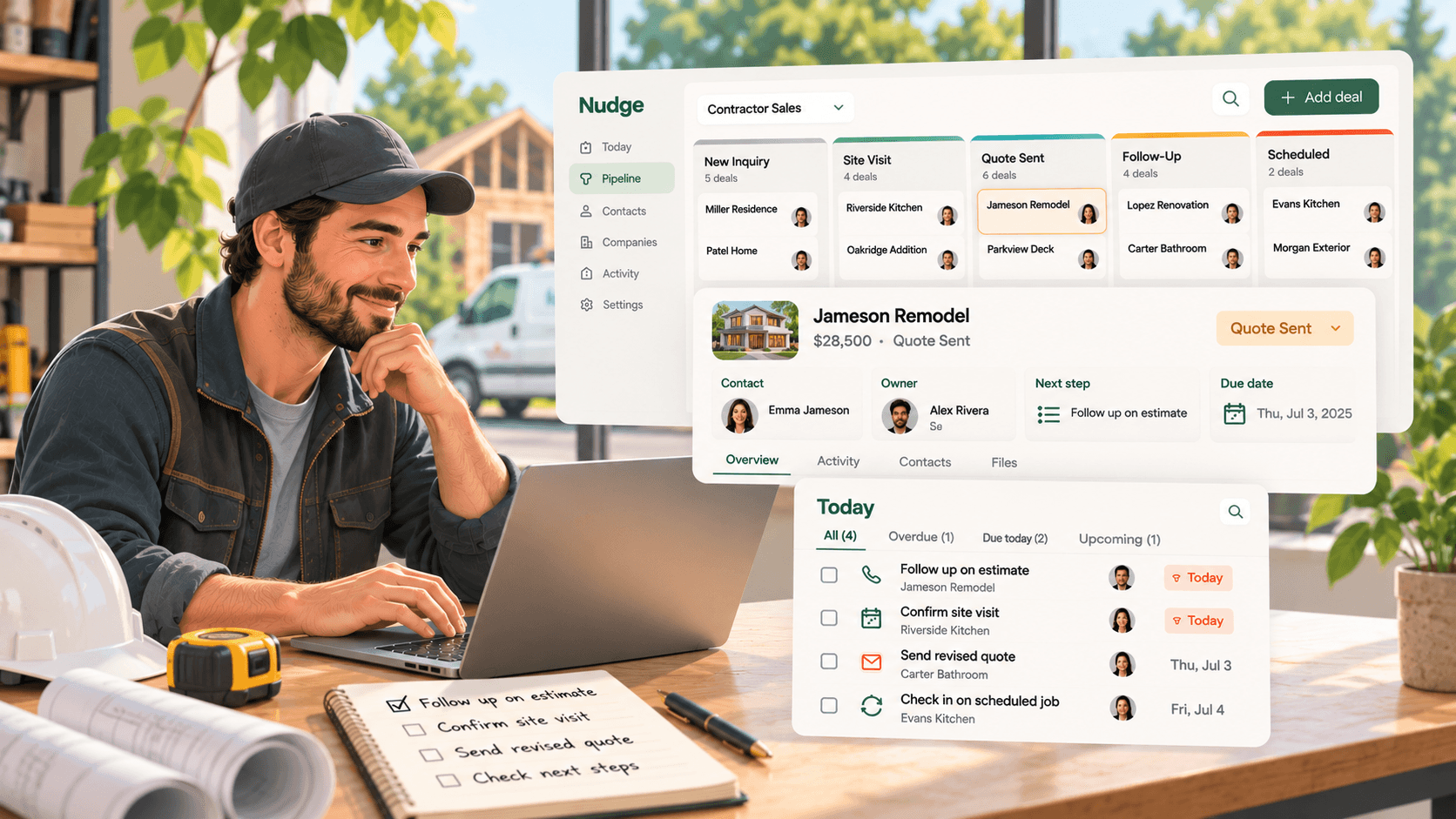
Nudge has a dedicated CRM solution for contractors and home service businesses.
Its approach focuses on keeping inquiries, quotes, and follow-ups connected to clear responsibilities.
A pipeline that reflects contractor sales
Nudge supports configurable pipelines that can follow a workflow such as:
Lead → Site visit → Quote sent → Follow-up → Scheduled → Completed
This gives teams visibility into where each opportunity stands.
Owner, next action, and due date
Nudge requires active deals to have an owner, a next action, and a due date.
For contractors, that might mean:
Owner: Alex
Next action: Call homeowner about roof estimate
Due: Wednesday
Or:
Owner: Jordan
Next action: Confirm kitchen renovation site visit
Due: Friday
The purpose is to make sure the opportunity does not sit without someone responsible for moving it forward.
A daily view of outstanding work
Nudge's Today list brings overdue, due-today, and upcoming actions together.
It is accessible on desktop, tablet, and mobile, which is useful for teams moving between the office and job sites.
Custom fields for contractor information
On Premium, Nudge supports custom fields on Businesses, Contacts, and Deals.
Contractors can use these for information such as job type, address, quote amount, permit status, expected start date, or other details relevant to their sales process.
Activity history and email capture
Calls, emails, meetings, and notes can be recorded in the activity timeline.
Nudge also supports email capture through a workspace dropbox, allowing relevant emails to be attached to the appropriate records.
Team visibility
Shared pipelines allow team members to review opportunities.
Nudge also provides visibility into team tasks and overdue work, helping owners and managers understand where attention is needed.
These features are designed to support sales follow-through rather than replace construction operations software.
Moving contractor leads and estimates from spreadsheets into Nudge
Many small contractors begin tracking sales in Excel or Google Sheets.
The spreadsheet might include customer names, phone numbers, job addresses, estimate values, and follow-up dates.
That information can become difficult to maintain as more inquiries and quotes accumulate.
Nudge supports CSV imports on its Base plan.
Its Premium plan and trial include AI-powered CSV and XLSX imports, including multi-sheet workbooks.
The importer can suggest mappings for contacts, businesses, deals, activities, and custom fields.
Users can review the mapping, check flagged duplicates, and preview the import before completing it.
Premium also supports undoing an import when necessary.
For contractors, that means an existing spreadsheet can become the starting point for a structured sales pipeline.
The important step after importing is reviewing active opportunities and making sure they have clear owners, next actions, and due dates.
What Nudge does not replace
Contractors often need specialized tools for running projects.
Those may include:
- Estimating and takeoff software
- Crew scheduling
- Dispatch
- Job costing
- Inventory and materials management
- Invoicing and payments
- Construction project management
- Field service operations
Nudge is not positioned as a replacement for those systems.
Its focus is on the sales relationship: capturing inquiries, managing opportunities, recording conversations, assigning follow-ups, and keeping responsibility clear.
That makes it important to evaluate your software needs separately.
If your main problem is managing crews and job costs, you may need a contractor operations platform.
If your main problem is losing track of inquiries and estimates before customers make a decision, a sales-focused CRM may be more relevant.
How to choose the right CRM for your contracting business
Before choosing a contractor CRM, ask:
- Can we record new inquiries without losing important customer details?
- Can we track opportunities from inquiry through estimate and decision?
- Can we see which estimates are waiting for a response?
- Does every opportunity have a clear owner?
- Can we assign a specific next action and due date?
- Can our team see overdue follow-ups?
- Can we keep site visit notes and customer conversations together?
- Can we track the job information that matters to our sales process?
- Can we use the CRM when working away from the office?
- Can we import our existing customer and estimate records?
- Does the CRM fit alongside the operational tools we already use?
The right CRM should solve the problems that make it harder to win work.
It should not require the team to maintain information that nobody uses.
Start by reviewing your open estimates
You do not need to redesign your entire sales process to identify where follow-ups are being missed.
Start with the estimates your team has already sent.
For each one, ask:
Who owns this opportunity?
Has the customer responded?
What needs to happen next?
When should that happen?
If those answers are unclear, the opportunity needs attention.
Then review your new inquiries and upcoming site visits.
Make sure every active opportunity has a clear next action, whether that means qualifying the job, scheduling a visit, preparing an estimate, or following up with the customer.
The goal is not to add more administrative work.
It is to make sure potential jobs do not depend on someone remembering to check an old email or spreadsheet.
For small contractors, that kind of consistency can make a meaningful difference in how the sales process operates.
Nudge is built around that principle, connecting every active deal to an owner, a next action, and a due date.
If your team needs a clearer way to manage inquiries, estimates, and follow-ups, you can try Nudge with a 14-day free trial. No credit card is required.